WPA\WPA2
in WPA and WPA2 the cracking process is so similar and the attacks we use against WPA could work on WPA2 also at first always when trying to hack something we should always think about the simplest method so before start hacking the WPA/WPA2 in the normal way it is worth it to check if WPS is enabled on the network if yes we can exploit it and connect to the network without knowing the password only the 8 digits PIN number. more about WPS https://en.wikipedia.org/wiki/Wi-Fi_Protected_Setup and this only will work if the WPS is configured for PIN authentication and not a PBC(Push Button Authentication). notice that we are not exploiting WPA\WPA2 we are exploiting a feature that could be enabled on both of them. now to scan all the WPA\WPA2 networks with WPS enabled in your area we are going to use the Wash tool in Kali Linux with the command below:
wash --interface <the name of the interface with monitor mode>Failed to associate [SOLVED] after we found a network running a WPS feature now before launching the attack we have to associate with the router (feakauth) we will do this with a command that we already learned:
aireplay-ng --fakeauth <30 - to fakeauth every 30 seconds> -a <the router MAC> -h <your own MAC> <the interface name>Reaver is a Kali Linux tool that will help us brute force the PIN number. more about Reaver you can see at https://www.kali.org/tools/reaver/ the command we will use is:
reaver --bssid <the mac address of the target> --channel <the channel> --interface <interface name in monitor mode> -A -vvv #this will show us info# --no-associate after entering this command we should associate the command with aireplay-ng its better to associate with a client with aireplay-ng, not with reaver.
the scanning stuck at 0% [SOLVED] At some point after successful association with the router, the reaver app is not brute-forcing the PIN code and the process is stuck at 0%. in order to solve this problem and debug the issue we run the same command but with options that will show us all that happened in the background “-vvv”. this will print to us the process reaver do in the background then we will notice to main errors 0x3 & 0x4 that it could be solved with “-N” argument for more check reaver man page.
WPS locks and bypassing it [SOLVED] after X numbers of wrong PIN numbers, the WPS has locked the way to unlock it is to disconnect all the clients from the router (run airplay without specifying a client) then they will think that something happened to the router and go to restart it then the WPS will be unlocked. another way is called MDK3 this tool is a proof of concept tool that can prevent a DDOS attack on the router by sending too many associations request from different legitimate MAC addresses which case the router to crash and reset by itself the command that we will use is:
mdk3 <monitor mode NIC> <modes like "a"> -a <the target MAC> <-m to use availed MAC addresse>if the network does not have WPS there is a different way to hack WPA\WPA2 the first step is to capture the handshake of connecting a new client for the network so will issue two commands we learned before airodump-ng against a specific network to see clients connected and then aireplay-ng to disconnect them to force them to reconnect and capture the handshake. the only useable information in the pcap file is the three-way handshake that with it we can check if the password we have (and we have lots of it🙂 ) because of famous wordlist and we can create our own wordlist. the information in the three-way handshake cannot help us recalculate or recover the key of the network and because of this, we are matching this pcap file with all optional passwords we have in a wordlist. for more check out the Crunch man page. How to create your own wordlist? we will do this with a tool called Crunch will help us make our own wordlist the syntax of the command is simple:
crunch [min number of characters for the pass that will be generated][max number of characters for the pass that will be generated][charchters: for example upper case lower case] -t [pattren specify that the pass will start with an A or end with a B etc..] -o [filename]Example: crunch 6 8 123abc$ -o wordlist -t a@@@@b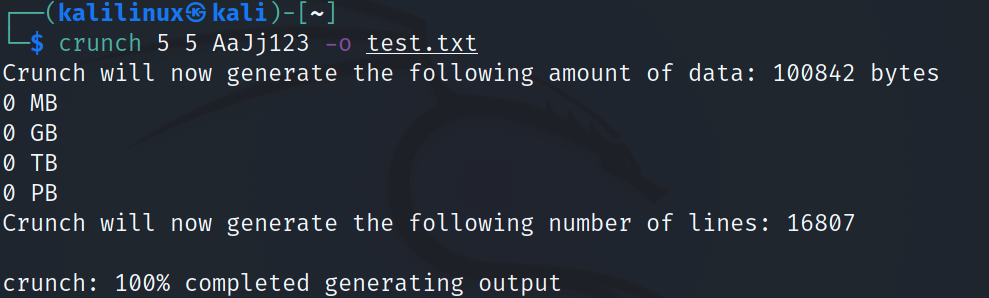 now after we already know what we are going to do let's understand how we are going to crack the password from the three-way handshake if this information is not useable and does not contain the password in order to understand this we need to know what MIC is so MIC stands for Message Integrity Check is used by the access point to check if the password is good or not. in order to generate a MIC, we have to have [SP Address, STA Address, AP Nonce, STA nonce, EAPOL, Payload] capturing these packets will help us to generate a new MICs with all the optional passwords that we have and compare it with the MIC that we captured. we are going to do this with aircrack-ng. the syntax is very simple:
aircrack-ng <the name of the handshake file.CAP> -w <the name of the wordlist>Huge wordlist issue with Crunch [SOLVED] now we have one problem the wordlist can be more than 1000 TiraBytes and we don't have this much storage so the solution is to pipe the wordlist into aircrack-ng without saving it:
crunch 4 5 abc123 | aircrack-ng -b <bssid> <WPA handshake> -w <–>now when you use aircrack-ng don’t specify the path of the word list instead use – (hyphen sign) so basically what will happen when you hit enter crunch will print all the passwords on the terminal and the piping method will tell aircrack-ng to use this as a wordlist instead of looking for the wordlist from the directory now aircrack-ng will start reading from the terminal and will use it as a wordlist. Pause and Resume Wordlist Attack with Jhon the Ripper first, we are going to list our wordlist in the terminal window using this command:
Jhon --wordlist=<wordlist name> --stdoutnow list redirect the output of this command to be the input for aircrack-ng command:
Jhon --wordlist=<wordlist name> --stdout --session=<the session name anything> | aircrack-ng -w <-> -b 00:00:00:00:00:00 <the handshake file>then when we press ctrl-C the session has been stored with the name that we specified and to resume it we will type:
Jhon --restore=<the session name anything from previous command> | aircrack-ng -w <-> -b 00:00:00:00:00:00 <the handshake file>How to combine both resume and pause cracking and not saving the wordlist what we will do now is to generate a wordlist with a crunch like we did until now then we will pass the list to Jhon that will pass it to aircrack-ng using Piping for example:
crunch 8 8 | Jhon --stdin --session=session1 --stdout | aircrack-ng -b 00:00:00:00:00:00 -w <-> <handshake file>to pause this thing simply press ctrl-C but to resume the session issue this command:
crunch 8 8 | Jhon --restore=session1 | aircrack-ng -b 00:00:00:00:00:00 -w <-> <handshake file>What is PMK in WiFi? After the PSK or 802.1X authentication, a shared secret key is generated, called the Pairwise Master Key (PMK). In PSK authentication, the PMK is the PSK, typically derived from the WiFi password by putting it through a key derivation function that uses SHA-1 as the cryptographic hash function. WIFI Password + ESSID = PMK. we can also convert our word list to a PMK list in this way: What is a Rainbow table? A rainbow table is a precomputed table for caching the output of cryptographic hash functions, usually for cracking password hashes. Tables are usually used in recovering a key derivation function up to a certain length consisting of a limited set of characters. Cracking WPA\WPA2 using [Rainbow Tables] with airolib-ng we need to issue 4 commands within 4 steps: 1-at first create a database and import a wordlist
airolib-ng <Database_Name> --import passed <dictionary> 2-Seconde import the target ESSID
airolib-ng <Database_Name> --import essid <essid-file> 2.1-to create an ESSID file simply write the target AP name in a file you can do it following this command:
echo "target_AP_Name" > "filename" 3-Third compute the PMK for the wordlist
airolib-ng <Database_Name> --batch4-Fourth and last step is to crack the key using the PMK database
airolib-ng -r <Database_Name> <handshake file>after making a list full of PMK and launching the attack you will notice it will be so much quicker than aircrack-ng converting and comparing in real time because this is a list of already converted PMK so aircrack-ng will just compare the PMK in order to fund the key.
Cracking WPA\WPA2 much faster Using HashCat and GPU power when cracking a password using aircrack-ng like we learned the default behavior for the computer is to use the CPU power in order to do this but there is a more powerful method to crack a password is to use the GPU instead because it is after and can calculate if a shorter period of time. we will do this with a hashcat tool in order to do this in any OS we need to install the relevant GPU driver from the hashcat official site and we need at least one GPU. then we need to convert the .cap file that includes the three-way handshake into a hccapx file which hashcat will understand in order to do this we can issue this command in Kali Linux:
aircrack-ng newcapture2.txt-01.cap -j HashCatFormatFilemore about HashCat Hash Cat
WPA Enterprise
WPA-Enterprise works like WPA-Personal (WPA-PSK) but requires each user to self-authenticate via a RADIUS server. WPA-Enterprise works by assigning a long encryption key to each connected device. This key, which is shared with users, is not visible, virtually impossible to break, and is automatically changed on a routine basis. The RADIUS server encompasses IEEE 802.1x, in which users are authenticated based on their account certificates.
WPA-Enterprise primarily uses the Advanced Encryption Standard (AES) encryption mechanism but also supports Temporal Key Integrity Protocol (TKIP).
the way to hack this type of network is to launch an Evil Twin attack with a rogue AP that we will create and continuously disconnect the clients from the legitimate AP forcing them to connect to us then they will receive a popup window to type there credentials to the network and it will be forwarded to us see Evil Twin