WifiPhisher
Step 1: Install Wifiphisher To get started, we can open a terminal window and type apt install wifiphisher to install Wifiphisher.
apt install wifiphisherIf you want to try installing it from the GitHub repo , you can do so by cloning the repository and following the instructions on the GitHub page, as such: (its better to clone the app)
~# git clone https://github.com/wifiphisher/wifiphisher.git
~# cd wifiphisher
~# sudo python setup.py install
Step 2: Review Wifiphisher's Flags You should be able to run the script at any time by simply typing sudo wifiphisher in a terminal window. While Wifiphisher has no manual page, you can see in its --help page that it has a pretty impressive list of configuration options you can change by adding various flags to the command. Step 3:Plug in Your Wireless Network Adapter Now is the time to prepare the wireless network adapter by plugging it in. Wifiphisher will put your card into wireless monitor mode for you if you don't do so yourself. Step 4:Run the Script I'm going to use my USB wireless network adapter, so I'll add an -i flag to the command and add the name of my network adapter. If I don't, Wifiphisher will just grab whatever network adapter it can. To start the script, I'll run the following command.
wifiphisher -i wlan1or simply
wifiphisher --force-hostapdNext, the script will ask what attack you want to run. Select option 2.
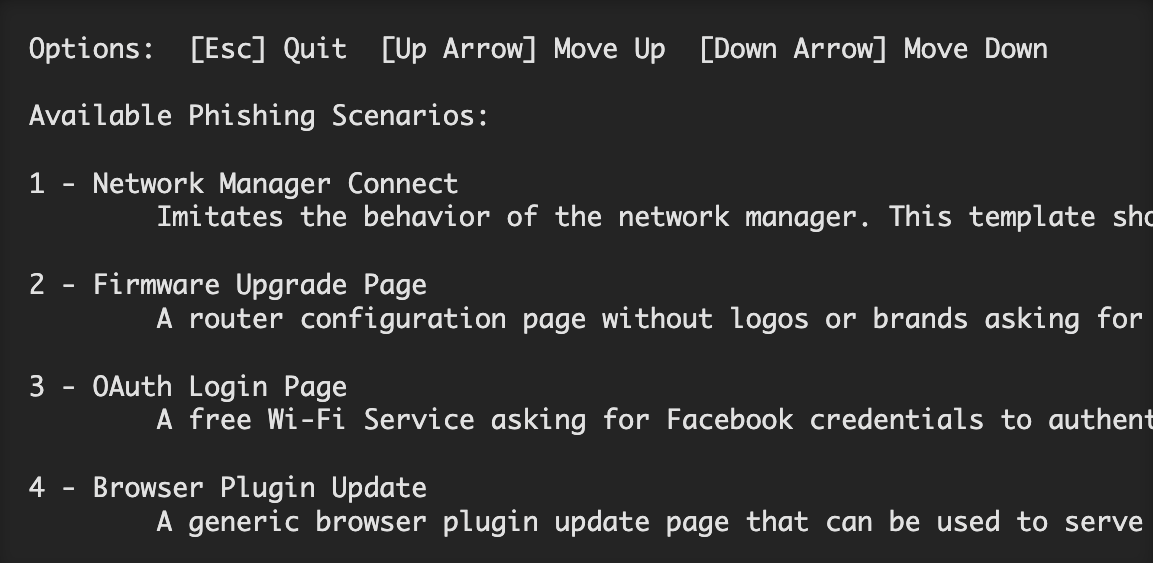 After selecting the attack, it will immediately launch. A page will open to monitor for targets joining the network. Wifiphisher will also listen for devices trying to connect to networks that aren't present, and it will create fake versions to lure those devices into connecting.
After a target joins, a pop-up will demand they enter the password.
When the target enters the password, we're notified in the Wifiphisher screen.
That's it! The script will exit and present you with the password you just captured. Just like that, you've bypassed any password security and tricked a user into entering the Wi-Fi password into your fake network. Even worse, they're still stuck behind this horrible slow-moving, fake loading screen. for the full tutorial see: https://null-byte.wonderhowto.com/how-to/hack-wi-fi-get-anyones-wi-fi-password-without-cracking-using-wifiphisher-0165154/
After selecting the attack, it will immediately launch. A page will open to monitor for targets joining the network. Wifiphisher will also listen for devices trying to connect to networks that aren't present, and it will create fake versions to lure those devices into connecting.
After a target joins, a pop-up will demand they enter the password.
When the target enters the password, we're notified in the Wifiphisher screen.
That's it! The script will exit and present you with the password you just captured. Just like that, you've bypassed any password security and tricked a user into entering the Wi-Fi password into your fake network. Even worse, they're still stuck behind this horrible slow-moving, fake loading screen. for the full tutorial see: https://null-byte.wonderhowto.com/how-to/hack-wi-fi-get-anyones-wi-fi-password-without-cracking-using-wifiphisher-0165154/