FluxionOSINT
How Fluxion Works Its Magic Fluxion is the future — a blend of technical and social engineering automation that tricks a user into handing over the Wi-Fi password in a matter of keystrokes. Specifically, it's a social engineering framework using an evil twin access point (AP), integrated jamming, and handshake capture functions to ignore hardware and focus on the "wetware." Tools such as WifiPhisher execute similar attacks but cannot verify the WPA passwords supplied. Fluxion evolved from an advanced social engineering attack named Lindset where the first tool was written mostly in Spanish and suffered from several bugs. Fluxion is a rewritten attack to trick inexperienced users into divulging the password/passphrase of the network. Fluxion is a unique tool in its use of a WPA handshake to not only control the behavior of the login page but the behavior of the entire script. It jams the original network and creates a clone with the same name, enticing the disconnected user to join. It presents a fake login page indicating the router needs to restart or load firmware and requests the network password to proceed. Simple as that. The tool uses a captured handshake to check the password entered and continues to jam the target AP until the correct password is entered. Fluxion uses Aircrack-ng to verify the results live as they are entered, and a successful outcome means the password is ours. Tactically, the attack is only as good as the fake login screen. Many have been added to Fluxion since it was created, and it's possible to develop other screens with some research. In general, running the attack with default login screens will immediately call attention from a more experienced user or tech-savvy organization. The attack is most effective when targeted at whoever is the oldest or least tech-savvy in an organization. Sensitive APs with intrusion detection systems may detect and attempt to defend against the attack by blocking your IP in response to the integrated jamming. System Compatibility & Requirements Fluxion works on Kali Linux. Just make sure that you are fully updated or that you're running Kali Rolling to ensure the system and dependencies are current. You may run it on your dedicated Kali install in a virtual machine. If you're looking for a cheap, handy platform to get started on, check out our Kali Linux Raspberry Pi build using the Raspberry Pi 3 or Raspberry Pi 4 The tool will not work over SSH since it relies on opening other windows. How to Capture WPA Passwords with Fluxion Our goal in this article will be to target an organization via its WPA encrypted Wi-Fi connection. We will launch an attack against users attached to the access point "Probe," capture a handshake, set up a cloned (evil twin) AP, jam the target AP, set up a fake login page, and confirm the captured password against the handshake. Step 1: Install Fluxion The developer of Fluxion shut down the product recently, but you can get an older version of it to use still. To get the older version of Fluxion running on your Kali Linux system, clone the Git repository with:
git clone https://github.com/wi-fi-analyzer/fluxionCheck for missing dependencies by navigating to the folder, then list the contents to see what's in it.
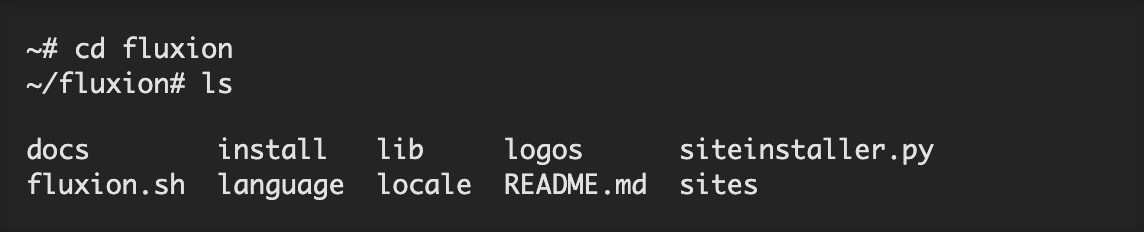 Next, start it up for the first time with ./fluxion.sh(if not root, use sudo ./fluxion.sh). You'll likely see the following, where some dependencies will be needed.
To fetch dependencies needed and set your board to green, install the missing ones from the list. In my case, it's dhcpd, lighttpd, and php-cgi.
Next, start it up for the first time with ./fluxion.sh(if not root, use sudo ./fluxion.sh). You'll likely see the following, where some dependencies will be needed.
To fetch dependencies needed and set your board to green, install the missing ones from the list. In my case, it's dhcpd, lighttpd, and php-cgi.
~/fluxion: apt install dhcpd lighttpd php-cgiFor dhcpd, if it installs udhcpd instead, run the following command to get the right one.
~/fluxion: apt install isc-dhcp-serverAfter all the dependencies are met, the board is green, and you can proceed to the attack interface. Run the Fluxion command again with ./fluxion.sh(or sudo ./fluxion.sh) to get hacking.
Step 2: Scan Wi-Fi Hotspots
The first option is to select the language. Do so by typing the number next to the one you want and pressing Enter to proceed to the interface selector. Here, you'll see all of your connected network interfaces. Choose the number next to the one that you want, in my case, 1for wlan2.
That will take you to the target identification stage. If the channel of the network you wish to attack is known, you may enter 2 to narrow the scan to the desired channel. Otherwise, select 1
to scan all channels.
A WiFi Monitor window will open while it occurs, so allow the scan to collect wireless data for at least 30 seconds. It's essential to let the attack run for at least 30 seconds to verify if a client is connected to the network. Press Control-C or click the window (x) to stop the capture process whenever you spot the wireless network that you want. After you do so, the window will close and the results will appear back in the terminal.
Step 3: Choose Your Target AP
Select a target with active clients for the attack to run on by entering the number next to it. Unless you intend to wait for a client to connect (possibly for a long time), the attack will not work on a network without any clients. Without anyone connected to the network, who would we trick into giving us the password?
Step 4: Select Your Attack
Once you've typed the number of the target network, in my case, 46 press Enter to load the network profile into the attack selector. For demonstration purposes, I'll use option 1 to make a FakeAP" using Hostapd It will create a fake hotspot using the captured information to clone the target access point.
Step 5: Get a Handshake
To verify that the password you receive works, you can check it against a captured handshake. If you have a handshake, you can enter it on the next screen. If not, we can press Enter
to force the network to provide a handshake in the next step.
The screen to check that handshake will appear as seen above. Using the Aircrack-ng method by selecting option 2 Fluxion will send de-authentication packets to the target AP as the client and listen in on the resulting WPA handshake. But first, you need to choose who to deauth, which I'd recommend option 3 so you only deauth the target and not everyone.
Two windows will pop up, one for Capturing data on channel and one for Deauthenticating client
In the first window, at the top, look out for the "WPA handshake" to appear. When you see it, as it does in the top right of the screenshot below, you have captured the handshake.
Close both of those windows. Back in the terminal, type 1 for "Check handshake," and hit Enter
to load the handshake into your attack configuration.
Now, create an SSL certificate, option 1 so you can create a pop-up without causing an alarm and preventing the browser from navigating to it.
Step 6: Create the Fake Login Page
Now it's time to create the fake login page. Select option 1 for "Web Interface" to use the social engineering tool.
You will be presented with a menu of different fake login pages you can offer to the user. These are customizable with some work but should match the device and language. The defaults should be tested before use, as some are not very convincing. I chose an English language Netgear attack, option 27 Now for the final step to arm the attack. At this point, you are ready to fire, so press Enter after selecting your language option to launch the attack.
The attack spawns multiple windows to create a cloned version of their wireless network while simultaneously jamming the common access point, enticing the user to join the identically named, but unencrypted, network.
Step 7: Capture the Password
The user is directed to a fake login page, which is either convincing or not, depending on which you chose.
Entering the wrong password will fail the handshake verification, and the user is prompted to try again. Upon entering the correct password, Aircrack-ng verifies and saves the password to a text file while displaying it on the screen. The user is directed to a "thank you" screen as the jamming ceases and the fake access point shuts down.
You can verify your success by checking the readout of the Aircrack-ng WiFi Information screen.
Congratulations, you've succeeded in obtaining and verifying a password, supplied by targeting the "wetware." You've tricked a user into entering the password rather than relying on a preexisting flaw with the security. see the full tutorial: https://null-byte.wonderhowto.com/how-to/hack-wi-fi-capturing-wpa-passwords-by-targeting-users-with-fluxion-attack-0176134/
Legally, Fluxion combines scanning, cloning, creating a fake AP, creating a phishing login screen, and using the Aircrack-ng script to obtain and crack WPA handshakes. As such, it leaves signatures in router logs consistent with using these techniques. Most of these practices are illegal and unwelcome on any system you don't have permission to audit.