Beacons Flooding
Beacon Flooding
- Beacon and Probe Response Flooding – a form of denial of
service attack that prevents a user from selecting the correct
access point in a series of possible choices. This attack can also
sometimes break nearby devices or confuse wireless intrusion
detection systems.
Beacon and Probe Response Flooding
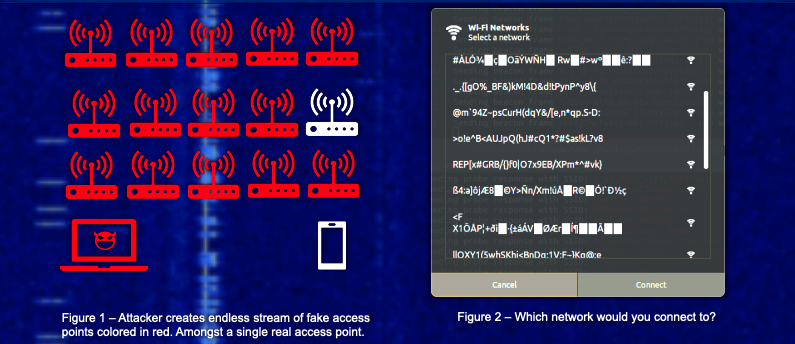
- Beacon flooding is based upon the idea that wireless beacon frames are sent out periodically to tell your device that a wireless access point exist within the area. Beacon flooding abuses this by sending out fake beacon frames broadcasting access points that don’t really exist. This is demonstrated in Figure 1.
- Probe response flooding is an extension of this type of attack. Periodically, your device sends out a probe request asking all nearby access points to notify it of their existence. When this happens, we send back several fake probe responses resulting in even more nonexistent access points appearing on your device. The result of this combined with beacon flooding can be seen in Figure 2.
- An attacker could even set the SSID names to be all the same as the organization they are targeting. For example, setting the name to be ‘asu’ for each fake access point. The user would be unable to determine which access point is real amongst all the fakes. This prevents the user from being able to connect to the access point.
In addition to g mode (WPA downgrade test), the following modes are also available: b – Flood mode beacons Sends beacon frames to display fake access points to clients. This can sometimes lead to a drop in network scanners or even drivers! Normal access points send out approximately 10 beacon frames per second. They are needed to identify the network, i.e. so that it is visible to other devices. When you scan a network, your map actually looks for radio beacon frames on every available channel. With MDK3, you can also send these frames to beacons. Consequently, you can create the appearance of the presence of as many wireless networks as you like. Remember that these are not real access points and it is impossible to connect to them. Additionally, this mode can be used to hide the network by generating thousands of fake networks with the same name as the original one. This mode has several options for specifying network names, encryption, creation speed, etc. The simplest example of running:
sudo mdk3 wlan0 bResult:
Beacons Swarming - Reverse KARMA.
Those. the space will be “flooded” with unreal APs with strange names. mdk3 fake ap-example.txt With the f option you can use the names of access points from the file:
sudo mdk3 wlan0 b -f /home/mial/bin/mdk3-master/useful_files/less-common-ssids.txtFile examples: https://github.com/charlesxsh/mdk3-master/tree/master/useful_files You can use the -n option to create fake access points with a specific name:
sudo mdk3 wlan0 b -n FreeWifiThe command in the following example tells mdk3 to jump on channels 1, 6 and 11 and turn off all the stations that will be found there. Most stations will try to reconnect, however, the normal exchange of data is no longer possible until the testing is stopped, because immediately after connecting they will be disconnected, mdk3 deauth example:
sudo mdk3 wlan0 d -c 1,6,11Please note that some APs independently change channels, i.e. if the access point has left any of the channels 1,6,11, then the attack no longer affects it. The following options are also available:
- w
- Read the file containing MAC addresses that should not be disturbed (Whitelist mode)
- b
- Read the file containing the MAC addresses that need to be tested (Blacklist mode)
- s
- Set speed in packets per second (Default: unlimited)
- c [channel, channel, channel, …]
- Enable channel switching. If no channels are indicated, mdk3 will jump on all 14 b / g channels. The channel will change every 5 seconds. f – MAC filter brute-force modeThis test uses a list of known MAC addresses of clients and tries to authenticate with them in a given AP, while dynamically changing the response timeout for better performance. Currently it works on APs that reject a properly open authentication request (implementation example):How to bypass MAC address filtering https://kalitut.com/mdk3-examples-tutorial/#more-62