Intro
https://null-byte.wonderhowto.com/how-to/hack-wi-fi-selecting-good-wi-fi-hacking-strategy-0162526/
01-intro.pdf
What is a MAC address?
Mac address is Media Access Control assigned by the manufacturer for the NIC of the devices.
The structure of a 48-bit MAC address. The b0 bit distinguishes multicast
and unicast addressing and the b1 bit distinguishes universal and locally administered addressing.
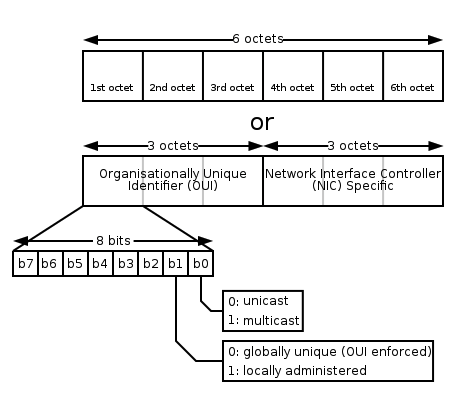 because of this, the first octet MUST be an even in the mac address.
Here's is how to change the MAC address in Untitled: you can change it using this script (with PowerShell 2.0 or later):
https://blueteampowershell.com/SEC505-Scripts.zipor simply from the device manager navigate for:
the specific NIC then right-click on the NIC → properties → Advanced → Network Address Here's is how to change the MAC address in Untitled : simply open the terminal and write down the following command
sudo ifconfig en0 ether <MAC address>Here's is how to change the MAC address in Untitled: first of all, in order to change the MAC address in Linux, you need to “Turn Off” the network card interface and you can do it with the command below:(do not forget to re-enable the interface!)
sudo ifconfig <interface name> down/upthen type down the command below: “HW” stands for hardware
sudo ifconfig hw <interface name> ether <the new MAC-address>after knowing how to be anonymous and hide our MAC address now is the time to set up our Alfa adapter. by default, the Alfa adapter comes in managed mode and to set the adapter into monitor mode issue this command on your Linux terminal
sudo iwconfig <interface name> mode monitor/manageyou may see this issue but don't worry just issue the shutdown interface command and try again
now you should kill all the network processes (not must but if you did you will receive better results) the command will kill the process and list for you the process PID on the screen so you re-enable it later or just reboot your machine, the command is:
sudo airmon-ng check kill